1. Bluesky Feeds /
  2. Bluesky Feed Creator /
  3. BSFC How Tos

This feed collects posts from Bluesky Feed Creator about how to use its service.

Feed on Bluesky

Feeds Stats

  • πŸ’™ Liked by 7 users
  • πŸ“… Updated 11 months ago
  • βš™οΈ Provider blueskyfeedcreator.com

BSFC How Tos Likes over time

Like count prediction
The feed BSFC How Tos has not gained any likes in the last month.

Feed Preview for BSFC How Tos

Bluesky Feed Creator
@blueskyfeedcreator.com
3 months ago
Thank you so much for the kind words β€” we really appreciate you using our service! πŸ™Œ Just a heads-up: we’ve actually added exact capitalization detection already through Auto Moderator. Here’s an example of how to set it up. Hope that helps streamline your feed!

blueskyfeedcreator.com

Specify term case | Bluesky Feed Creator

1
0
0
Bluesky Feed Creator
@blueskyfeedcreator.com
3 months ago
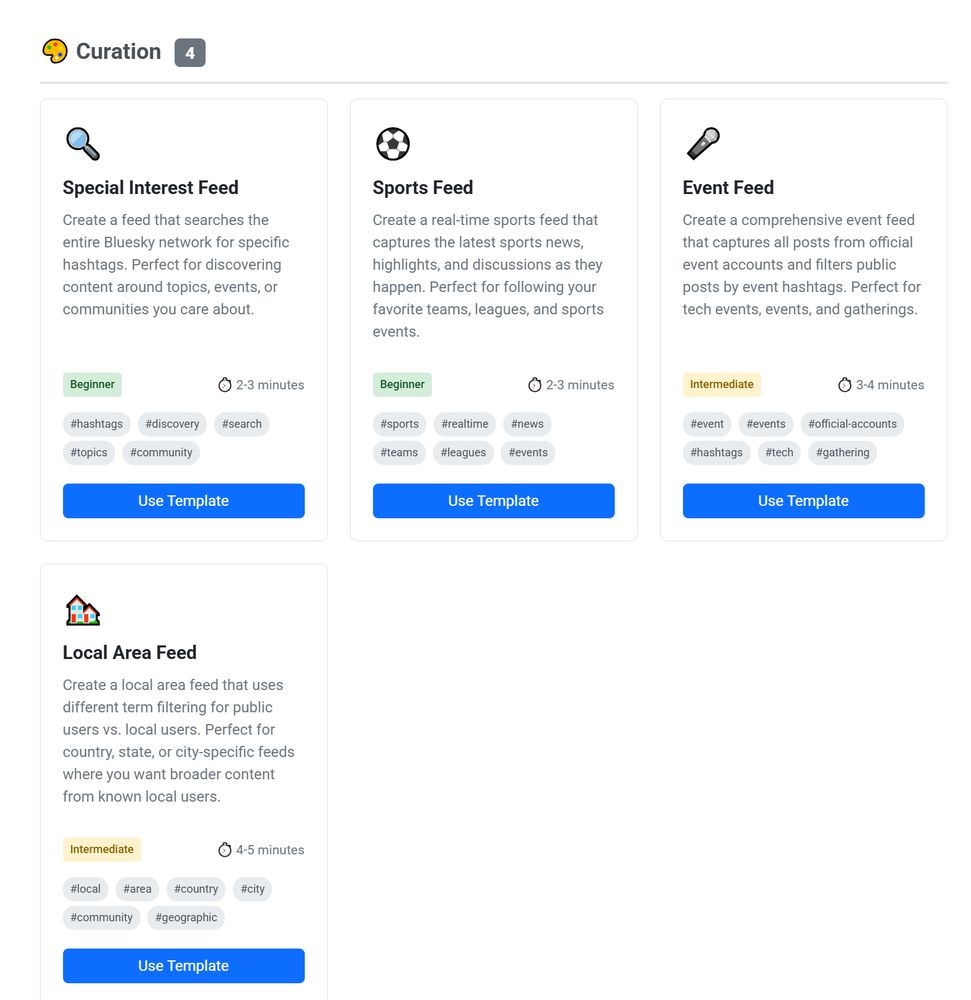
When you make a new feed on Bluesky Feed Creator, you'll find things looking a bit different - we've put together some templates to help get your feed set up quick. Great if it's your first time making a feed because they're really easy to use! We'll add new templates every so often.
Screenshot of the setup for an event feed, asking for a title, description and path.
Screenshot of BSFC interface showing 4 options for feeds under "Curation" type. They're for special interests, sports, events and a local area.
Screenshot of setup for a local area feed, with public terms, optional excluded terms, and an area to add a local user list and local user terms too.
Screenshot of the final feed settings part on a local area feed where the settings are being amended about including replies along with posts, whether text, image, gif, video and quote posts are included, how to sort and retention limit.
2
3
21
Bluesky Feed Creator
@blueskyfeedcreator.com
4 months ago
Yes you can do this by syncing a list of your follows and blocking them from your feed. Can't do this (yet) with posts though.
0
0
0
Bluesky Feed Creator
@blueskyfeedcreator.com
5 months ago
Ok now it's broken for me as well! Will add some additional logging, so if you could please leave as it is. I think unpublishing and publishing would fix it (maybe even just 'save' would fix it) but I want to investigate the cause 😁.
1
0
1
Bluesky Feed Creator
@blueskyfeedcreator.com
8 months ago
Fair enough! When you do, this tutorial is just about a match except your starter pack is the synced list, so all the relevant screenshots for you. This - and then * to grab all of their posts.

blueskyfeedcreator.com

Setting up a feed with people you follow | Bluesky Feed Creator

1
0
2
Bluesky Feed Creator
@blueskyfeedcreator.com
9 months ago
Hi! Just jumping in to say, if I'm understanding your issue correctly, it can generally be solved using search operators e.g. + (this term + this term must be present) or - (collect posts with this term except when they also have this term). Or for topics with frequent crossover, you could exclude..
1
0
1
Bluesky Feed Creator
@blueskyfeedcreator.com
9 months ago
The feed's settings have explicitly excluded the post based on a word in the text, so everything is working correctly from our perspective 😁.
Screenshot of BSFC interface showing how to test a post that isn't in the feed. The result says:

Post matches excluded term(s) "mean".
1
0
1
Bluesky Feed Creator
@blueskyfeedcreator.com
9 months ago
In order to use *, you have to also specify a list of users. Otherwise you could search for some common Spanish words instead, or locations if it's area specific for example. We'll look at adding a workaround for this by language though.
1
0
1
Bluesky Feed Creator
@blueskyfeedcreator.com
9 months ago
Our service doesn't collect posts retrospectively, only from the point the feed is made. So once a user posts a video matching your feed terms, it'll appear in your feed. However, you can also query a user in the tools area and the service will grab the 50 most recent posts of theirs which match.
1
0
1
Bluesky Feed Creator
@blueskyfeedcreator.com
9 months ago
Yes, you can do this on our service but it does rely on user reported language being correct. Check out our help, specifically our video feed based tutorials. Language is just one of our many filtering options.
1
0
1
Bluesky Feed Creator
@blueskyfeedcreator.com
9 months ago
10) Filter tabs These let you filter the posts in your feed to match a particular criterion e.g. Auto moderated means acted on by Auto Mod. These tabs work with the bulk actions too so e.g. in the For manual approval tab, you can approve or deny all. #bsfchowto
Screenshot of BSFC Recent Posts area showing the tabs at the top of the posts column, which read All posts / Visible in Bluesky / For manual approval / Auto moderated / Hidden
0
0
2
Bluesky Feed Creator
@blueskyfeedcreator.com
9 months ago
9) Listen for new posts toggle. If you switch this off it pauses the feed, so no new posts will be collected until you turn it back on. Posts that were posted while you had the feed paused won't be recovered. This is great if you're amending terms and settings and want to avoid mishaps. #bsfchowto
Screenshot of BSFC Recent Posts interface with Listen for new posts toggle circled in red. In the image it is toggled on, so it is green.
1
0
2
Bluesky Feed Creator
@blueskyfeedcreator.com
9 months ago
8) Search posts. Type anything into the search box and we'll show you the posts that match it. This searches post text, alt text, name/handle, languages, labels. 8*) Once you've searched for something, if you use a bulk action it will apply to those visible searched posts only. #bsfchowto
Screenshot of BSFC Recent Posts area, with a red squircle drawn around the "Search captured posts" box.
1
0
1
Bluesky Feed Creator
@blueskyfeedcreator.com
9 months ago
6) Pin a post! Pinning a post to the top of your feed means that until you unpin it, it will show up there first for everyone who opens the feed. You can pin multiple posts. 7) Block user - remember this blocks a user from posting in the feed, not seeing posts from your Bluesky account. #bsfchowto
Screenshot of BSFC Recent Posts interface showing a post and "pin to top" is circled in red.
Screenshot of BSFC Recent Posts interface, showing a post with "block user" circled.
1
0
2
Bluesky Feed Creator
@blueskyfeedcreator.com
9 months ago
4) Insert post manually - grab a link to any post and insert it into your feed. It does not need to match your rules. 5) Test a post - put the link in to any post and click Test post, to find out why it was not included. This is great for making sure you're getting the content you want. #bsfchowto
Screenshot of BSFC Recent Posts interface with a circle drawn around the Insert post manually button.
Screenshot of BSFC interface showing the dialog box that comes up when you click Insert post manually. There is a box for the link to post, and also three buttons saying Cancel / Test post / Insert post.
Screenshot of the Manually Insert Post dialog again with a blue box which has popped up after clicking Test post. It says "Post doesn't match any of the includes defined."
1
0
1
Bluesky Feed Creator
@blueskyfeedcreator.com
9 months ago
2) Toggle media to show all when you're moderating manual approval posts. This expands all the images so you don't have to keep clicking to open them. 3) Bulk actions. These apply to all posts in view. The irretrievable ones (delete, deny) have an "are you sure you're sure" function. #bsfchowto
Screenshot of BSFC Recent Posts interface with the show media toggle circled. You can choose between default and expand all.
Screenshot of BSFC Recent Posts area with "Actions" dropdown button circled in red
Screenshot of BSFC Recent Posts interface with the possible actions dropped down. They are delete and deny (with red text), approve and show (with green text) and hide (with yellow text).
Screenshot of BSFC interface showing "delete these posts" dialog box. It says "This will delete [number] posts under the [Visible in Bluesky tab] from your [feed] feed." There is a confirmation box which says "DELETE 2558 POSTS" and you have to type in that exact text before it will work.
1
0
1
Bluesky Feed Creator
@blueskyfeedcreator.com
9 months ago
#bsfchowto Secrets of the Recent Posts moderation area! Well, they're not secret. But some of you might not have used them. So here goes: 1) Hide any post! This happens straight away, so that the next time a person loads your feed or refreshes it, the post is ✨✨gone✨✨
Screenshot of BSFC Recent Posts interface showing a post with the "hide from feed" button circled. It is underneath the text portion of a post but above the image.
2
5
13
Bluesky Feed Creator
@blueskyfeedcreator.com
9 months ago
#bsfchowto Tomorrow I'll talk about some of the handy things you can do in the Recent Posts area, and I've got lots of other tips after that too. All of these posts will go into the BSFC How Tos feed below, so they're easy to keep track of if you ever need to come back to something.
0
0
5
Bluesky Feed Creator
@blueskyfeedcreator.com
9 months ago
#bsfchowto Once in a feed, the interface looks like this. Click on alt text for descriptions of each area. We've made these sections collapsible - just click the arrow in the top right hand corner. We've set our service up to be almost entirely workable with just plain text. No code! NO CODE!
Location sets up where your feed 'lives' - whose account is it published under? What is the feed path (this goes into the URL/link)? 
Public Information is for things that are visible to the feed viewers - the title, which shows up in search, and the description, which sits at the top of the feed when it's open (but not when it's pinned). Content mode allows you to choose between normal view and vertical video (Tiktok) mode.
Capturing Posts is all about getting posts into your feed. The blue box is for search terms. You set inclusion terms (words, phrases, emoji strings or hashtags) that the feed looks for when someone makes a new post.
You can also set exclusion terms (if a post has one, it cannot be shown) and manual approval terms (the feed will get the post but you have to okay it before it's shown in the feed).
Decide whether you want to search for terms in post text, alt text and embedded links.
The rest of the green box is about toggles. Here, you can decide whether to include posts and replies or just posts, whether or not you want images, gifs, video, quote posts. Whether you want to order by chronology or likes/replies/reposts. Whether you want pending posts put in straight away, or to wait for any labels. And whether you want to capture posts from everyone or just a specific list of users.
Screenshot shows a graph titled feed views with two lines (total views and scroll paging) and below it, a yellow box titled Recent Posts. The tab "visible in Bluesky" is selected and below it you can see a search box and a post from the Bluesky Feed Creator account, which is bold because it's pinned.
There are some buttons to right which say "Listen for new posts" (this is a toggle. If you switch it off the feed becomes temporarily inactive, until you turn it back on. This means posts stop coming into the feed), a Show media set of buttons where you can have default behaviour or expand all media, and then a drop down button for Actions which handles bulk actions like approve, deny, hide.
2
0
7
Bluesky Feed Creator
@blueskyfeedcreator.com
9 months ago
I'm also going to start some tutorial content from the beginning and working up to our more advanced features. First off, the feeds list. You're probably familiar with this landing page. If you've got posts to approve in any feeds, you'll get a little red icon here too - like this. #bsfchowto
2
1
16
Bluesky Feed Creator
@blueskyfeedcreator.com
9 months ago
These are, of course, super useful for recreating your following feed, if that's something you want to do. You could also split your following up into different groups using private lists, and then adjust the terms to only hear about certain things from certain people, for example.
Screenshot of custom poster permissions inside BSFC, showing the Unique Terms tab with text written into inclusion terms.
0
0
7
Bluesky Feed Creator
@blueskyfeedcreator.com
10 months ago
Hi there, what specifically are you struggling with? Happy to help. Our service definitely works fine for general use in most cases, for instance, check out the Birds feed! We also have a very detailed help, including video tutorials if needed. blueskyfeedcreator.com/help
0
0
1
Bluesky Feed Creator
@blueskyfeedcreator.com
10 months ago
Hi Lana, don't forget to check on the help! It's here: blueskyfeedcreator.com/help There's also a video tutorial for that tool: youtu.be/9kOEZgn2NEs?...

blueskyfeedcreator.com

Bluesky Feed Creator

1
0
0
Bluesky Feed Creator
@blueskyfeedcreator.com
10 months ago
Yes! You could use this Auto Moderator rule to do that:

blueskyfeedcreator.com

Hide posts based on author handle subdomain | Bluesky Feed Creator

1
0
1